
Adafruit цвет фона нестандартного шрифта
- Войдите на сайт для отправки комментариев
Пнд, 04/06/2018 - 15:34
Здравствуйте, подсоединяю LCD экран 128х160 к ардуино UNO. Все работает нормально, но захотелось поменять шрифт стандартный на другой. Вроде прочитал что Adafruit позволяет это делать вот тут https://learn.adafruit.com/adafruit-gfx-graphics-library/using-fonts
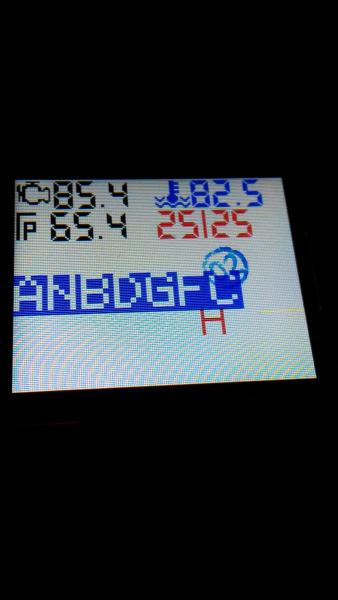
Все сделал по инструкции, получилось. Цвет букв и цвет фона в скетче задавал командой
tft.setTextColor(ST7735_BLACK, ST7735_BLACK);
В ходе эксперементов определил что фон меняется только у стандартного шрифта, который библиотека adafruit использует по умолчанию. Как я понял это файлик glcdfont.c.
Как сделать чтоб фон можно было менялся и в собственном шрифте?
Пример кода программы
#include <Adafruit_GFX.h>    // Core graphics library
#include <Adafruit_ST7735.h> // Hardware-specific library
#include <SPI.h>
#include <Fonts/DigitalDisplay.h>
#define TFT_CS     10
#define TFT_RST    8  // you can also connect this to the Arduino reset
                      // in which case, set this #define pin to 0!
#define TFT_DC     9
void setup(void) {
  // Use this initializer if you're using a 1.8" TFT
  tft.initR(INITR_BLACKTAB);   // initialize a ST7735S chip, black tab
  tft.fillScreen(ST7735_WHITE);
  delay(500);
  tft.setRotation(3);
  tft.setFont(&DigitalDisplay);
}

void loop() {
 // мой шрифт
  tft.setFont(&DigitalDisplay);
  tft.setCursor(80, 39);
  tft.setTextColor(ST7735_RED, ST7735_BLACK);
  tft.println("25|25");
  tft.drawChar(100, 100, 'H', ST7735_RED, ST7735_BLUE, 1);
  //tft.invertDisplay(true);
  //delay(500);
 // стандартный шрифт
  tft.setFont();
  tft.setTextColor(ST7735_WHITE, ST7735_BLUE);
  tft.setTextSize(3);
  tft.println("ANBDGFC");
  //delay(1000);
}
угу....дочитался The background color feature has typically been used with the “classic” font to overwrite old screen contents with new data. This only works because those characters are a uniform size; it’s not a sensible thing to do with proportionally-spaced fonts with characters of varying sizes (and which may overlap).