
объясните что нетак
- Войдите на сайт для отправки комментариев
Чт, 11/02/2016 - 21:49
#include <Wire.h>

#include <NewPing.h>

#include <LiquidCrystal_I2C.h>

#define TRIGGER_PIN  12
#define ECHO_PIN     13
#define MAX_DISTANCE 200

NewPing sonar(TRIGGER_PIN, ECHO_PIN,MAX_DISTANCE);

LiquidCrystal_I2C lcd(0x27,16,2);
void setup(){

    // set up the LCD's number of columns and rows:

  lcd.begin(16, 2);

  // initialize the serial communications:

  Serial.begin(9600);

}


void loop()

{

  delay(50);                      // Wait 50ms between pings .

  unsigned int uS = sonar.ping(); // Send ping, get ping time in microseconds (uS).

  Serial.print("Ping: ");

  Serial.print(uS / US_ROUNDTRIP_CM); // Convert ping time to uS / US_ROUNDTRIP_CM in cm and print result (0 = outside set uS / US_ROUNDTRIP_CM range)

  Serial.println("cm");

     if (uS / US_ROUNDTRIP_CM >= 200 || uS / US_ROUNDTRIP_CM <= 0){ // If there's no object within 200cm or if the distance equals zero

    //lcd.clear();

     // Go to this position. (3,1) implies 3 units towards posiive X-axis and 1 units towards negative Y-axis. We start at (0,0)

    lcd.print("I see nothing!!"); // Notify that no object is spotted within the 200 cm range

  }

  else { // but if there's an object within 200 cm

    lcd.clear();

    lcd.setCursor(2,0); // Go to this position

    lcd.print("Object Spotted!!"); // Notify that there's an object

    lcd.setCursor(2,2);

    lcd.print("It's");

    lcd.setCursor(7,2);

    lcd.print(uS / US_ROUNDTRIP_CM); // the distance between Dist-Bot and the object

    lcd.setCursor(10,2);

    lcd.print(" Cm");

    lcd.setCursor(14,2);

    lcd.print("far");

  }

 delay(1000); // a delay between the corresponding outputs


}
загружается код но экран не реагирует а может у кого готовый есть код для LCD 16x2 шина I2C а то никак не хочет работать много кодов перепробовал тоесть дисплей работает
с библиотеками а с датчика HC-SR04 ниче не выводит
переходник вот такой: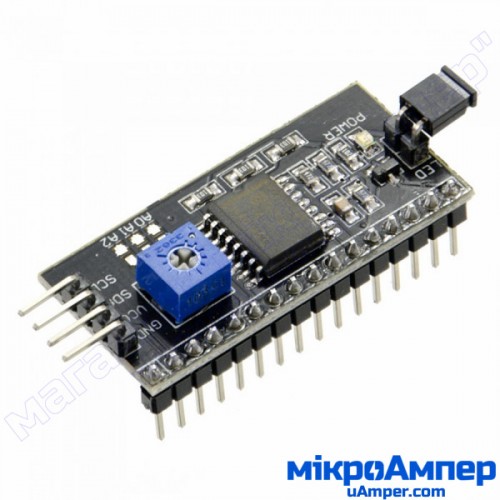
Источник prod663-LCD_20x4_shina_I2C
экран такой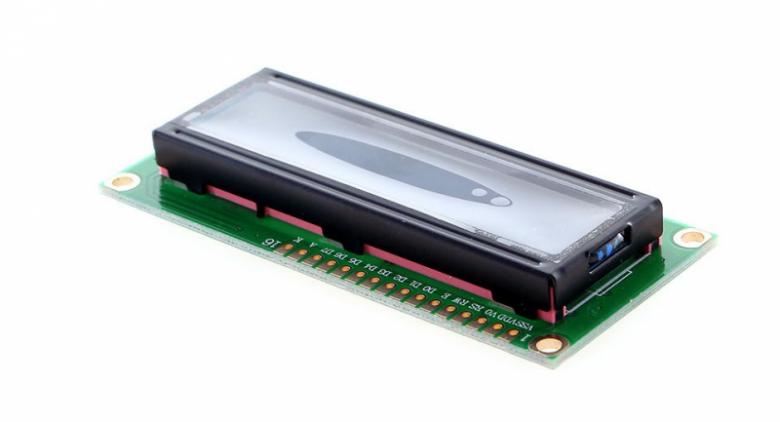
не сочтите за рекламу
Попробуйте для начала простой пример из библиотеки
LiquidCrystal_I2C.h://YWROBOT //Compatible with the Arduino IDE 1.0 //Library version:1.1 #include <Wire.h> #include <LiquidCrystal_I2C.h> LiquidCrystal_I2C lcd(0x27,16,2); // set the LCD address to 0x27 for a 16 chars and 2 line display void setup() { lcd.init(); // initialize the lcd lcd.init(); // Print a message to the LCD. lcd.backlight(); lcd.setCursor(1,0); lcd.print("Hello, world!"); lcd.setCursor(0,1); lcd.print("Ywrobot Arduino!"); } void loop() { }А еще, может адрес у модуля быть другим(не 0x27), есть ссылка на страницу, где покупали модуль?
Можно адрес модуля сканировать.
И пины Arduino UNO для подключения A4 и A5
дело в том што библиотеки рабочие но когда загружаю по одной
А вот когда загружаю их вместе то работает только датчик
А на экране пусто тоесть он просто светится и все а показания дачика не выводит
Я не правильно видать функцыи вывода прописую
На место 39 строки добавьте текст из 66. Он может в ваше ветвление вообще никогда не попадает.
Это уже обсуждалось тут несколько раз, вот одна из тем.
В строке 18 должны быть пустые скобки
спасибо)) всем
Это уже обсуждалось тут несколько раз, вот одна из тем.
спасиба сработало